
Are you getting the most out of your Keeper Security investment? Many Northern Michigan businesses we work with have Keeper deployed but are barely scratching the surface of its capabilities. Today, we're diving deep into the advanced features that transform Keeper from a simple password manager into a comprehensive security powerhouse.
Whether you're managing a dental practice in Harbor Springs, running a manufacturing operation in Gaylord, or overseeing a healthcare network across the region, these advanced Keeper features will elevate your security posture while streamlining operations.
Emergency Access: Your Security Lifeline
What happens when your IT administrator is unreachable during a critical security incident? Emergency access planning isn't just good practice: it's essential for business continuity.

Setting Up Emergency Access Policies
Keeper's emergency access feature allows designated users to request temporary access to critical accounts during genuine emergencies. Here's how we configure it for our clients:
- Designate emergency contacts: Typically, we recommend having at least three emergency contacts who can approve access requests
- Set approval timeframes: Configure automatic approval after 24-72 hours if emergency contacts don't respond
- Define critical systems: Identify which accounts require emergency access (server credentials, email admin accounts, financial systems)
Real-World Scenario: Last winter, a Petoskey medical office experienced a server failure during a blizzard when their primary IT contact was snowed in. Thanks to properly configured emergency access, authorized staff could retrieve server credentials within hours, minimizing patient care disruption.
Best Practices for Emergency Access:
- Test emergency procedures quarterly
- Maintain updated contact information for all emergency approvers
- Document which systems require emergency access
- Train staff on proper emergency access procedures
Compliance Tools: Meeting Regulatory Requirements
Northern Michigan businesses face various compliance requirements: HIPAA for healthcare, SOX for public companies, and industry-specific regulations. Keeper's compliance tools make audits less stressful and more successful.
Comprehensive Audit Reporting
Keeper generates detailed reports showing:
- Who accessed what credentials and when
- Password security scores across your organization
- Compliance with password policies
- User activity logs with timestamps and IP addresses
Automated Compliance Monitoring
Set up automated alerts for:
- Weak or reused passwords
- Accounts without multi-factor authentication
- Users who haven't logged in for specified periods
- Policy violations requiring immediate attention
HIPAA-Specific Features:
- Encrypted storage of all healthcare-related credentials
- Detailed access logs for patient system passwords
- Automatic alerts for suspicious access patterns
- Secure sharing of credentials between authorized healthcare staff
We recently helped a Traverse City healthcare network prepare for a HIPAA audit using Keeper's reporting tools. The comprehensive logs and security documentation impressed auditors and demonstrated the organization's commitment to protecting patient data.
Custom Security Policies: Tailoring Protection
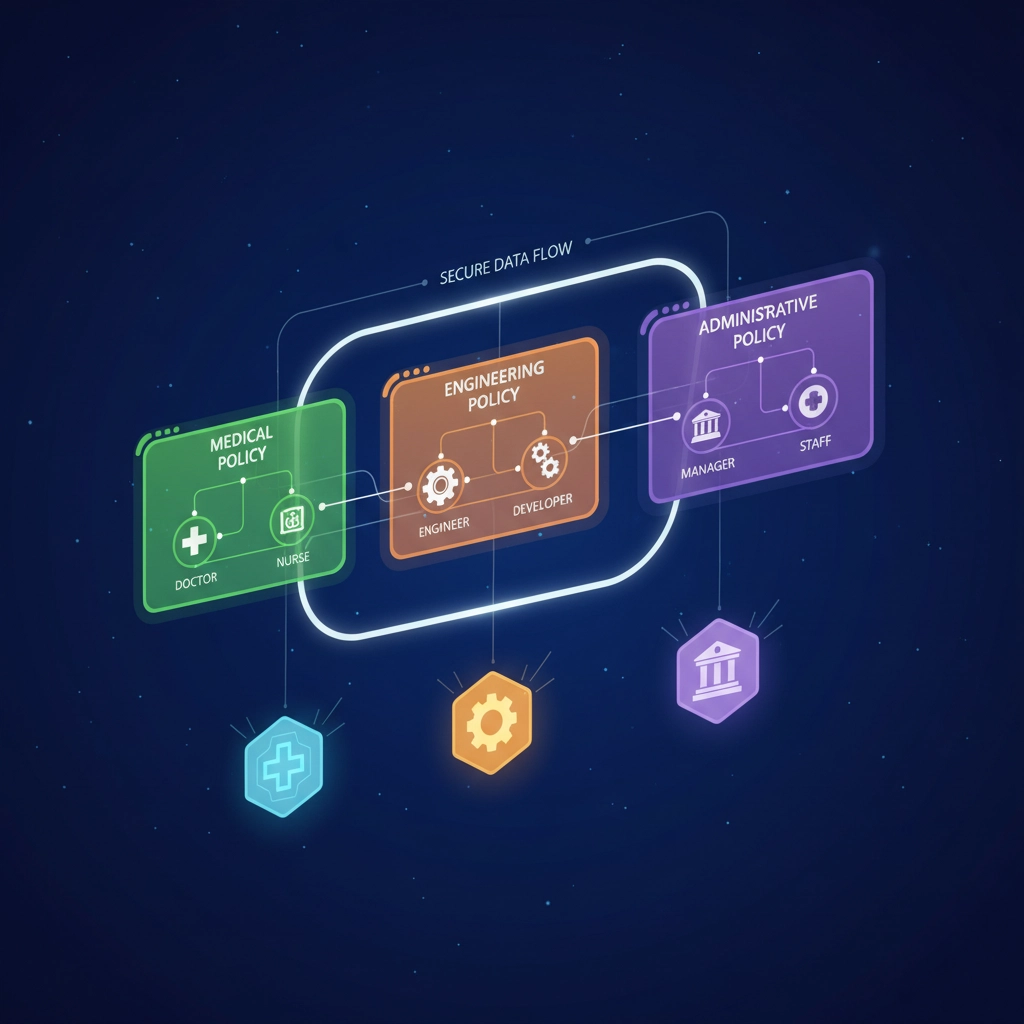
Every business has unique security requirements. Keeper's policy engine allows you to create custom rules that align with your specific operational needs and risk tolerance.
Password Policy Customization
Configure policies based on user roles:
- Executive accounts: Require 16+ character passwords with frequent rotation
- General staff: Enforce 12+ character passwords with standard complexity
- Temporary workers: Implement stricter monitoring with limited access duration
Device and Location Controls
Implement geo-fencing and device restrictions:
- Allow access only from approved IP ranges
- Require additional authentication for access from new locations
- Automatically lock accounts accessing from high-risk countries
Role-Based Access Control
Create detailed permission structures:
- Marketing team access to social media and advertising platform credentials
- Finance team access to banking and accounting system passwords
- IT administrators with full vault management capabilities
- Contractors with limited, time-bound access to specific systems
Custom Policy Example: A manufacturing company in Gaylord needed different security levels for office workers versus plant floor supervisors. We configured policies that required stronger authentication for users accessing production control systems while maintaining user-friendly access for general office applications.
API Integrations and Automation
Keeper's API capabilities unlock powerful automation opportunities that reduce manual work while enhancing security.
SIEM Integration
Connect Keeper to your Security Information and Event Management system:
- Stream authentication logs for centralized monitoring
- Correlate password access with other security events
- Create automated responses to suspicious activity patterns
Identity Provider Integration
Seamlessly connect with Active Directory, Azure AD, or other identity systems:
- Automatic user provisioning and deprovisioning
- Synchronized group memberships and permissions
- Single sign-on integration for streamlined user experience
Custom Automation Workflows
Build automated processes using Keeper's API:
- Automatically rotate shared service account passwords
- Generate reports for specific compliance requirements
- Create tickets in your help desk system for policy violations
- Sync password changes across multiple systems
Practical Integration Example: We helped a Harbor Springs accounting firm integrate Keeper with their practice management software, automatically updating client portal credentials and ensuring staff always had access to current passwords without manual updates.
Advanced Team Onboarding Best Practices
Bringing new team members into your Keeper environment safely and efficiently requires strategic planning and systematic execution.

Structured Onboarding Process
Week 1: Foundation Setup
- Create user account with appropriate role assignments
- Provide access to general business systems and applications
- Conduct initial security training focused on password best practices
- Set up multi-factor authentication on all accounts
Week 2-3: Role-Specific Access
- Grant access to department-specific shared folders
- Provide credentials for specialized software and systems
- Review security policies specific to their role
- Schedule follow-up training on advanced features
Month 2: Advanced Features Training
- Demonstrate secure sharing capabilities
- Show emergency access procedures
- Explain compliance reporting requirements
- Provide ongoing support resources
Offboarding Security
When employees leave:
- Immediately revoke vault access
- Transfer ownership of private records to supervisors
- Update shared credentials they may have known
- Generate reports showing their historical access patterns
Best Practice: Create onboarding checklists specific to different roles. A new nurse will need different credential access than a new accountant, and your onboarding process should reflect these differences.
Advanced Reporting and Analytics
Understanding how your team uses passwords and accesses systems provides valuable insights for improving security and productivity.
Security Score Analytics
Monitor organization-wide security metrics:
- Password strength distribution across departments
- Multi-factor authentication adoption rates
- Shared record security compliance
- Risk assessment trends over time
User Behavior Analytics
Identify patterns that might indicate security risks:
- Users accessing credentials at unusual times
- Accounts being accessed from new locations
- Patterns that might suggest compromised accounts
- Training needs based on user behavior
Custom Dashboard Creation
Build dashboards for different stakeholders:
- Executive summaries showing overall security posture
- Department-specific reports for managers
- Technical details for IT administrators
- Compliance-focused views for audit preparation
Troubleshooting and Ongoing Support
Even with proper setup, advanced Keeper deployments require ongoing attention and expert support.
Common Advanced Issues We Resolve:
- API integration failures affecting automated workflows
- Policy conflicts causing user access problems
- Performance issues with large vault deployments
- Complex sharing scenarios requiring custom solutions
Proactive Monitoring Services
At NTS, we provide ongoing Keeper support including:
- Monthly security score reviews with improvement recommendations
- Quarterly policy audits to ensure continued compliance
- Regular training sessions for new features and best practices
- 24/7 monitoring for critical security alerts
Expert Configuration Support
Our team handles complex configurations:
- Multi-tenant setups for businesses with multiple locations
- Advanced SSO integrations with legacy systems
- Custom API development for specialized workflows
- Disaster recovery planning and testing
Your Next Steps to Maximum Protection
Implementing these advanced Keeper features isn't something you have to tackle alone. The complexity of modern security requirements demands expert guidance and ongoing support.
Ready to unlock Keeper's full potential for your business? Our team has helped dozens of Northern Michigan organizations maximize their Keeper investments while maintaining the highest security standards. From initial advanced configuration to ongoing optimization, we're here to ensure your password management system works as hard as you do.
Contact us today for a comprehensive Keeper Security assessment. We'll review your current setup, identify opportunities for improvement, and create a roadmap for implementing these advanced features in your environment. Your business deserves maximum protection: let's make it happen together.
Visit our password management portfolio to learn more about our Keeper Security expertise, or reach out directly to discuss your specific advanced security needs.